Steam Shower
Main Bathroom
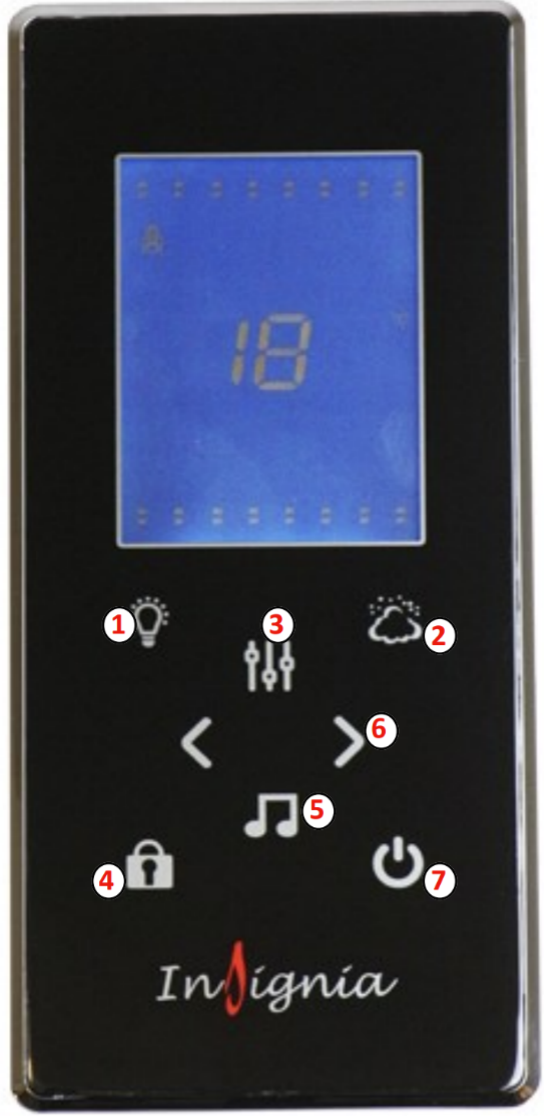
Button 1 (Lights) Once the control panel is switched on, the lights will come on automatically. Press the Light button once and the lights will start to scroll through the multiple colour options. Then to stop the lights on a specific colour simply press the light button again on the desired colour. To turn the lights off press the light button again.
Button 2 (Steam) To start the steam function, simply press the steam button (which looks like a cloud). To set the time and temperature of the steam session, simply press the mode button (button 3) and then use the arrows to scroll up and down (button 6)
Button 3 (Mode) This will do nothing on start-up, however it will be your go to button when using steam, radio and Bluetooth options
Button 4 (Padlock) This is your unlock button. After twenty seconds of inactivity the steam function will lock on the panel. This is done as a safety feature, so it can’t be accidentally activated. Other buttons will remain functional whilst in this state of ‘lock mode’
Button 5 (Music) Press once for FM Radio and press twice for Bluetooth. For tuning radio stations or connecting Bluetooth, please see the next page. For volume control, once on the radio or Bluetooth setting press Mode (button 3) then use the left and right arrows to change the volume. The volume is denoted by a number followed by the letters ‘db’
Button 6 (Left and Right Arrows) This will do nothing on start-up, however they are multi-functional depending on what setting you are using. When in the radio setting you can use them to change the station. When using the Bluetooth setting you can skip forward or back tracks in your playlist. You can also control the volume with these arrows as directed above.
Button 7 (Power) Press once to turn on the panel. Simply press again to turn it off. When powering down the 03 will automatically start and last for approximately 10 minutes. After this the screen will power of